Events and birthdays
On this page
The Events tab gathers your family’s special days for the year ahead. Birthdays and memorials appear on their own from the dates in your tree, and you can add anniversaries, gatherings and other events for everyone to see.
Where to find events
Events belong to the family tree you have open. Switch trees to see another family’s events.
- On iPhone and Android: tap the Events tab at the bottom of the screen.
- On iPad: choose Events in the sidebar.
- On the web: choose Events in the sidebar, or the Events tab at the bottom on a narrow window or phone browser.
Upcoming days also show on the Home tab and on each person’s page (see below).
What the Events list shows
The list covers the next 12 months, starting today. Events are sorted by date and grouped under month headings, such as November 2026.
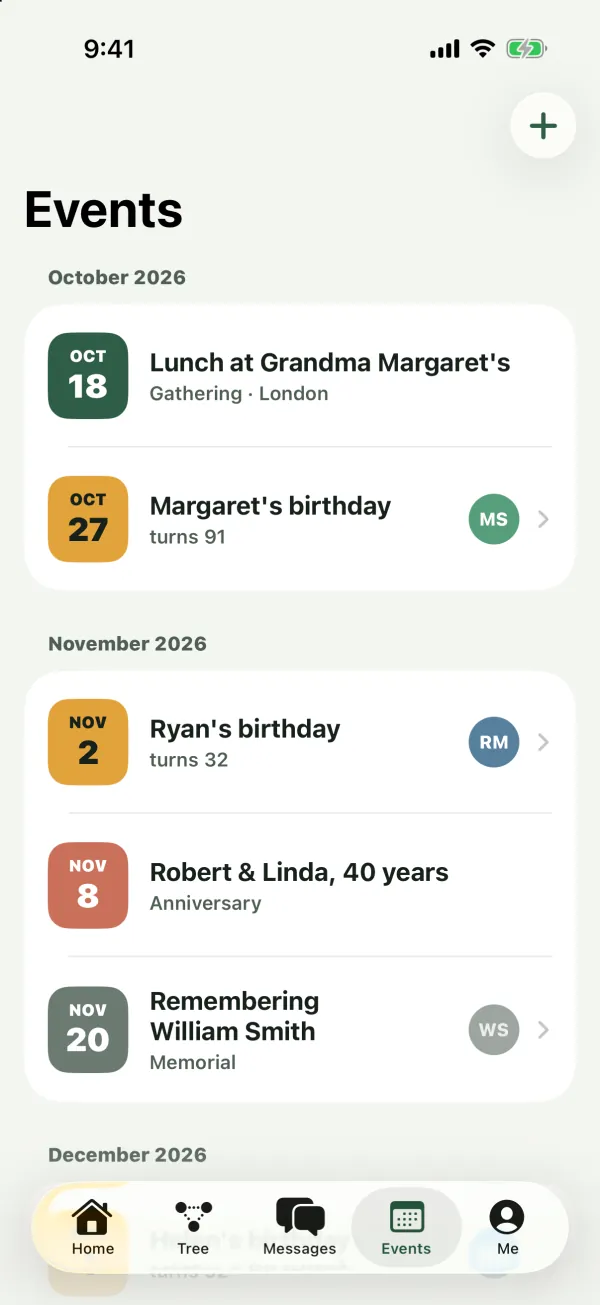
Each event shows:
- A date tile with the month and day. Each type of event has its own tile color, so you can tell them apart at a glance.
- The title, for example Grace’s birthday or Summer picnic.
- A short line with the type (Anniversary, Memorial, Gathering or Other) and the location, if there is one.
- The photo of the person the event is about, if it’s about someone in the tree. Photos of relatives who have passed away are dimmed.
Tap an event that’s about a person to open their page.
When nothing is coming up, you see Nothing coming up: Birthdays appear here automatically. Add gatherings, anniversaries and memorials too.
To refresh the list, pull it down (on iPhone, iPad and Android).
Birthdays and memorials appear on their own
You don’t need to add birthdays. Kindred creates them from the people in your tree:
- Birthdays: every living person with a birth date gets a yearly birthday, titled with their first name, for example Emma’s birthday. For birthdays, the line under the title shows the age they’re turning, for example turns 34. On the web, it shows both, for example Birthday · turns 34.
- Memorials: every person with a date of death gets a yearly memorial on that date, titled Remembering and their full name, for example Remembering Robert Smith.
Once a person has a date of death, their birthday no longer appears, and their memorial does.
These automatic events can’t be deleted from the Events list. To change or remove one, edit the person’s birth date or date of death on their page. See Edit a person.
Someone born on February 29 has their birthday on February 28 in years that aren’t leap years.
Which events repeat
- Birthdays, anniversaries and memorials come back every year on the same day. Enter the original date (for example, the wedding day for an anniversary) and Kindred always shows the next one.
- Gatherings and Other events happen once. They show until their date and then leave the list.
Add an event
Collaborators, admins and the tree’s owner can add events. Viewers can see events but don’t have the add button. See Members and roles.
- In Events, tap + at the top (on the web, Add event). When the list is empty, you can also use the Add event button in the middle of the screen.
- Choose the Type: Anniversary, Memorial, Gathering or Other. Gathering is selected when you start. Birthdays aren’t on the list, because they come from people’s birth dates.
- Enter a Title (required), for example Thomas and Linda’s anniversary.
- Pick the Date. It starts on today’s date.
- Optionally, choose who it’s About: a person from the tree, or No one in particular. When you choose a person, their photo shows next to the event and tapping the event opens their page.
- Optionally, add a Location and Notes.
- Tap Save.
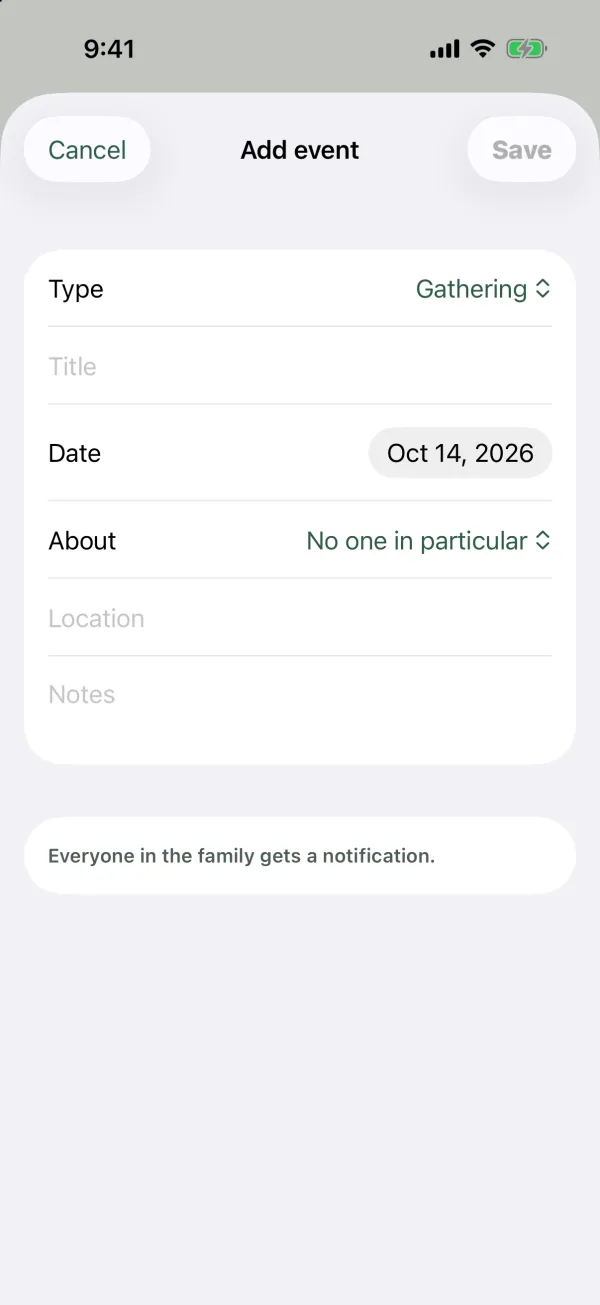
As the form says: Everyone in the family gets a notification. Every other member gets a notification in their inbox, and a push notification on iPhone and iPad, with the title and the date of the event.
Tip: A gathering or other one-time event with a date that has already passed won’t appear in the list. Pick a date that’s today or later.
Note: The title and location can be up to 200 characters each, and notes up to 2,000 characters.
Delete an event
You can delete events you added. Admins and the tree’s owner can delete any event someone added. If you’re a collaborator and try to delete someone else’s event, Kindred shows an error and keeps it.
- On iPhone and iPad: swipe left on the event and tap Delete.
- On Android: touch and hold the event, then tap Delete.
- On the web: select the trash icon next to the event, then confirm with Delete.
Deleting can’t be undone, and only events people added can be deleted (not automatic birthdays and memorials).
Events can’t be edited. To change one, delete it and add it again.
Upcoming days on the Home tab
At the top of the Home tab, a row of cards shows events in the next 30 days (up to eight). Today’s events are highlighted and labeled Today; others show their date. Cards show the location when there is one.
Birthday cards on a person’s page
When a living person’s birthday is in the next 14 days, their page shows a birthday card with the age they’re turning, such as Turns 34 in 5 days or Turns 34 today, and their full birth date.
Send birthday wishes
When the birthday person has their own Kindred account, you can wish them happy birthday from the app:
- On a birthday card on the Home tab, tap Send wishes.
- On the birthday card on their person page, tap Wish.
A new message opens, addressed to that person only, with Happy birthday, [first name]! 🎉 already written. Change the text if you like, choose the channels under Send via, and tap Send. The message reaches them according to their own channel choices. See Messages.
If the person doesn’t have a Kindred account, there’s no wishes button. You can still contact them with the call, WhatsApp or email buttons on their page, if their details are there. You can also invite them to the family.
Birthday reminders
On the day of a birthday, Kindred sends every member of the tree a reminder: Today is [name]‘s birthday! It arrives in the notifications inbox and, on iPhone and iPad, as a push notification (if you allow notifications from the Kindred app channel). The birthday person doesn’t get a reminder about their own birthday.
Reminders go out once a day, only for living people with a birth date in the tree.
There are no reminders ahead of time, and no day-of reminders for anniversaries, memorials, gatherings or other events. For those, members are notified once, when the event is added. Keep an eye on the Home tab and the Events list for what’s coming up.
Common questions
Why isn’t someone’s birthday showing?
The person needs a birth date in the tree and must not have a date of death or be marked as deceased. Open their page and check their details.
Can I add a birthday for someone who isn’t in the tree?
Not as a birthday. Add them to the tree with their birth date, or add an event with the type Other. An Other event doesn’t repeat, so you’d add it again each year.
Why can’t I add events?
You’re a viewer in this tree. Ask an admin to make you a collaborator. See Members and roles.
How do I change an event’s date?
Events can’t be edited. Delete the event and add it again with the right date. For birthdays and memorials, change the dates on the person’s page instead.
Does everyone see the events I add?
Yes. Events are shared with every member of that family tree, and everyone else gets a notification when you add one.
Why do I only get birthday reminders and not other events?
Kindred sends a day-of reminder for birthdays only. Other events notify the family once, when they’re added.