See where your family comes from
On this page
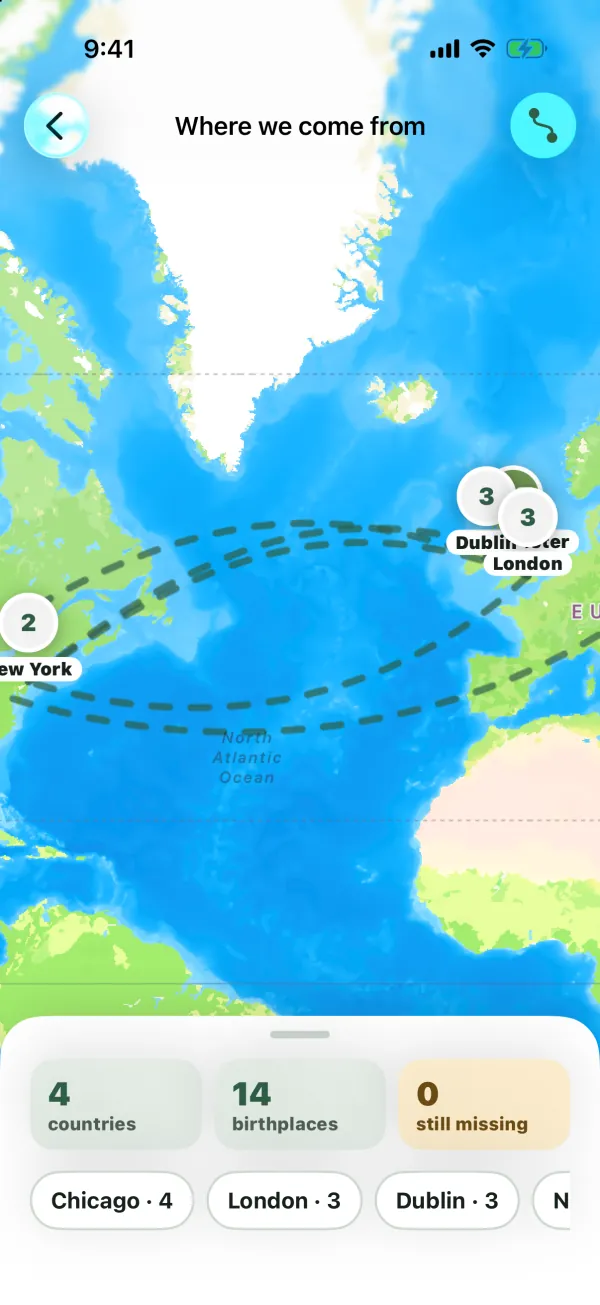
The Where we come from map puts every relative’s place of birth on a map of the world and draws lines showing how the family moved from one generation to the next. It also counts your countries and birthplaces, and helps you fill in the ones that are missing.
Open the map
The map shows the family tree that’s open right now. To see another tree’s map, switch trees first (see Keep several family trees).
- On iPhone and Android: on the Tree tab, tap the map button at the top, next to search.
- On iPad: tap Where we come from in the sidebar.
- On the web: click Origins map in the sidebar. On a phone-sized screen, tap the map button at the top of the tree page.
Everyone in the tree can open the map, including viewers.
What’s on the map
Birthplace pins
Each place where someone was born gets a pin.
- If one person was born there, the pin shows their photo (or their initials). People who have died are shown in faded colors, as on the tree.
- If several people were born in the same town, they share one pin with a number on it. People born within roughly a kilometer of each other count as the same place.
- Under each pin is the first part of the place name, for example “Dublin” for “Dublin, Ireland”.
When the map opens, it zooms to fit all the pins. You can pinch or scroll to zoom and drag to move around.
Only people whose place of birth was picked from the place search have a pin. A place typed as plain text has no map location, so it doesn’t appear (see Fill in missing birthplaces).
Migration lines
Dashed, gently curved lines connect a parent’s birthplace to their child’s birthplace, so you can follow the family’s journey across generations. A line is drawn only when both parent and child have a pin and the two places are a real distance apart; a child born in the same town as their parent gets no line.
To hide or show the lines, tap the lines button at the top of the map (its label is Show or hide migration lines). On the web it’s next to the Where we come from title in the panel.
The panel: counts and places
The panel at the bottom of the map (a floating card on iPad and on a large web screen) shows three numbers:
- countries: how many different countries your relatives were born in.
- birthplaces: how many people have a birthplace pin on the map.
- still missing: how many people have no pin yet. This only counts people you’re allowed to edit, so it’s the list you can fix. For a viewer it shows 0, and a collaborator sees the missing people in their own branch.
Below the counts:
- A row of places. Each chip shows a place and how many people were born there, for example “Boston · 4”, with the busiest places first. Swipe sideways to see more. Tap a chip to jump to that place.
- Born here. When you tap a pin or a chip, the map flies to it and the panel shows Born here, the place name, and the people born there, oldest first, with their years. Tap a person to open their page.
To go back to the list of places, tap an empty part of the map. On the web, click the close button next to the place name.
If nobody has a birthplace pin yet, the panel says “Add places of birth to see where your family comes from.”
Fill in missing birthplaces
If you can edit people in the tree and some of them have no pin, the panel shows Add missing birthplaces.
- Tap Add missing birthplaces. A list opens with everyone you can edit who has no pin. Under each name you’ll see either “Place of birth unknown”, or the text that was typed, for example ““Old Town” isn’t on the map yet”.
- Tap a person. Their edit form opens.
- Tap Place of birth and type a city, town or village.
- Pick the right place from the results. This gives the place its spot on the map and its country.
- Tap Save.
Back on the map, the new pin appears, the counts update and, if their parents or children have pins, migration lines are added.
Tip: If a place doesn’t come up in the search (for example a village that no longer exists), you can choose Use followed by the text you typed, marked “(no map pin)”. The place is saved on their page, but it won’t appear on the map, and the person stays in the missing list.
You can also add or change a place of birth any time from the person’s page. See Edit a person. Grew up in is a separate field and isn’t shown on this map.
Who can do what
| Action | Who |
|---|---|
| View the map, pins and lines | Everyone in the tree |
| Add missing birthplaces | Owner, admins, collaborators |
| Edit a collaborator’s missing people | Only those in their branch |
See Members and roles for what a collaborator’s branch includes.
Platform differences
- On iPhone and iPad, the map uses Apple Maps. On iPhone the panel runs along the bottom of the screen and the tab bar is hidden while the map is open; on iPad the panel floats in a corner.
- On Android, the map uses OpenStreetMap.
- On the web, the map uses OpenStreetMap-based maps, with zoom buttons, a compass and a scale in the corner.
The pins, lines, counts and missing list work the same everywhere.
Common questions
Why isn’t my grandmother on the map?
Either she has no place of birth yet, or it was typed as plain text instead of picked from the search. Open Add missing birthplaces (or her edit form) and pick her place of birth from the results.
Why is the country count lower than I expected?
Countries are counted from places picked in the search. Places typed as plain text have no country, so they aren’t counted.
Why don’t I see a line between a parent and child?
A line needs both of them to have a pin, and the two places have to be some distance apart. If they were born in the same town, or one of them has no pin, there’s no line. Lines also only follow parent and child links, not partners.
Why does “still missing” show 0 when I know people are missing?
The count only includes people you can edit. Viewers always see 0, and collaborators only see people in their own branch. An owner or admin sees everyone.
Does the map show all my trees together?
No. It shows the tree that’s open. Switch trees to see another family’s map.
Can I see where people grew up or lived?
Not on this map. It shows places of birth only.