Delete your account
On this page
You can delete your Kindred account yourself at any time, in the app or on the web. It takes effect immediately and can’t be undone. This guide shows the steps on each platform and explains exactly what’s deleted and what stays for your family. The legal summary is on the account deletion page.
Before you start
- Want to step away from one family only? Leave that family tree instead with Leave this family, and keep your account. See Members and roles.
- Do you own a family tree? If other people are in it, Kindred makes one of them the owner when you delete your account. If you’re the only member, the whole tree is deleted (see below).
- Are you a parent of a child account? Deleting your account doesn’t delete your child’s account. If you want it gone, remove it first in Me → Children. See Kids and parents.
- Keep what matters. Save any photos you want to keep, and consider exporting the family tree as an image or PDF. See Share your tree.
Delete your account
On iPhone and iPad
- Open Kindred and sign in.
- Go to the Me tab.
- Scroll to the bottom and tap Delete account.
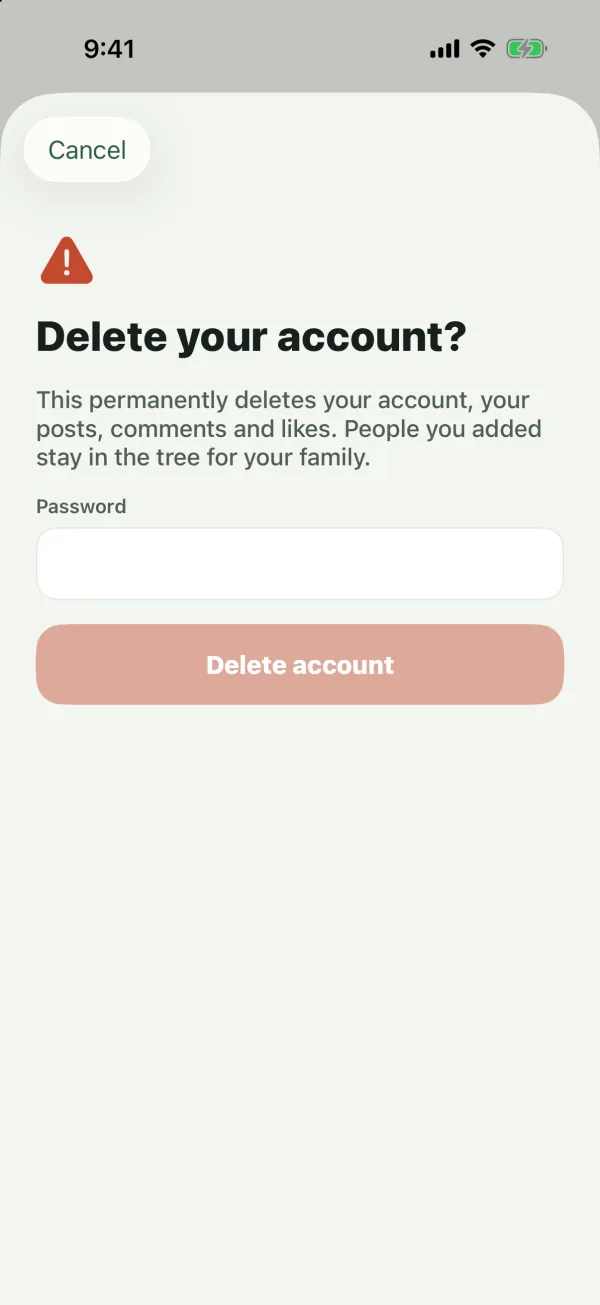
- Read Delete your account?
- Confirm it’s you:
- If you sign in with a password, enter your Password.
- If you sign in only with Google or Apple, type the confirmation word shown in Type DELETE to confirm (in English, the word is DELETE; capital or small letters both work).
- Tap Delete account.
On Android
- Open Kindred and sign in.
- Go to the Me tab.
- Scroll to the bottom and tap Delete account.
- Enter your Password, or type the confirmation word if you sign in only with Google.
- Tap Delete account.
On the web
- Go to kindredplace.app/app and sign in.
- Open Me (your name and photo at the bottom of the sidebar, or the Me tab on a narrow screen).
- At the bottom of the page, choose Delete account.
- Enter your Password, or type the confirmation word if you sign in only with Google or Apple.
- Choose Delete account.
Your account is deleted and you’re signed out right away. The confirmation reads: “This permanently deletes your account, your posts, comments and likes. People you added stay in the tree for your family.”
Note: If the password is wrong, you’ll see “Incorrect password.” Forgot it? Sign out, use Forgot password? to set a new one, then try again. See Get started.
What is deleted
- Your account, profile and sign-in details (including your Google or Apple sign-in link).
- Your posts (with their photos), your comments and your likes.
- Your membership in every family tree.
- Your registered devices, so notifications stop, and your notification inbox.
- Your message-channel preferences.
- Your reports and your blocks (and any blocks of you).
Copies in Kindred’s backups are removed later, as described on the account deletion page.
What stays for your family
- People in the family tree. Everyone you added, including the card that represented you, stays in the tree, no longer linked to your account. A tree admin can remove them, or you can ask Kindred’s team to.
- Edit history. Each tree’s history keeps its records, and your changes show as made by “A former member”.
- Messages already delivered by email, WhatsApp or text message stay in the recipients’ inboxes. Kindred can’t delete them.
Family trees you own
- If other people are members, ownership passes to an admin. If there’s no admin, it passes to the member who has been in the tree longest.
- If you’re the only member, the tree is deleted along with everything in it: its people, posts and photos.
Can’t sign in?
Contact Kindred’s team through Support, writing from the email address on your account, and ask for your account to be deleted. They’ll confirm it’s you before deleting it. You can also ask them to remove information a relative entered about you. See the account deletion page.
Common questions
Can I undo it?
No. Deletion is immediate and permanent. To use Kindred again, create a new account, and ask your family for new invitations.
I signed up with Google or Apple. Do I need a password?
No. If your account has no password, Kindred asks you to type the confirmation word instead.
Will my family know I deleted my account?
Your posts, comments and likes disappear, and you’re no longer listed as a member. Your card stays in the tree, no longer marked as on Kindred.
Can my child’s account be deleted?
Yes. A parent can remove it in Me → Children with Remove account. A child can also delete their own account from the Me tab. See Kids and parents.
I only want to stop notifications or messages. Do I have to delete my account?
No. Turn off the channels you don’t want in the Me tab under Notifications. See Notifications.